What Is The Legal Tint In Ms

Ever found yourself squinting at your phone screen in broad daylight, wishing you could give it a pair of sunglasses? Well, you're not alone. That's where Mobile Screen Tint,...

Ever found yourself squinting at your phone screen in broad daylight, wishing you could give it a pair of sunglasses? Well, you're not alone. That's where Mobile Screen Tint, or MS, comes in - it's like giving your phone a pair of virtual shades. But what exactly is it, and why should you care?
What's the Big Deal About MS?
Imagine MS as your phone's personal window tint. You know, like the one on your car that keeps the sun from turning your face into a lobster while you're driving. It's not just about looking cool (though let's face it, who doesn't want their phone to look like it's wearing a tiny pair of Ray-Bans?), it's about functionality.
Why Not Just Use Night Mode?
Night Mode is great, don't get me wrong. It's like your phone's version of a cozy cabin in the woods - all warm and inviting. But it's not always practical. Sometimes you need that extra bit of brightness to see what you're doing, especially if you're out and about in the daytime.
That's where MS comes in. It's like Night Mode's cooler, more laid-back cousin. It doesn't just dim the screen, it actually changes the color temperature to make it easier on the eyes. It's like trading in your phone's blindingly bright fluorescent lights for some soft, warm incandescent bulbs.
So, What's Legal and What's Not?
Now, you might be wondering, "What does 'legal' have to do with my phone's screen tint?" Well, here's the thing: not all MS is created equal. Some apps out there promise to give your screen a tint, but they can actually damage your phone's display over time. Others might not work with all apps, or might drain your battery faster than a vampire at a blood bank.
That's why it's important to use a legal MS. By 'legal', I mean one that's been approved by your phone's manufacturer. These are usually built into your phone's settings, or come as part of a certified app. They've been tested and approved, so you know they're safe to use.
How to Spot a Legal MS
Spotting a legal MS is easy. If it's built into your phone's settings, it'll usually be called something like 'Adaptive Brightness' or 'Night Light'. If it's an app, it should be clearly labeled as being compatible with your phone model, and it should have good reviews from other users.
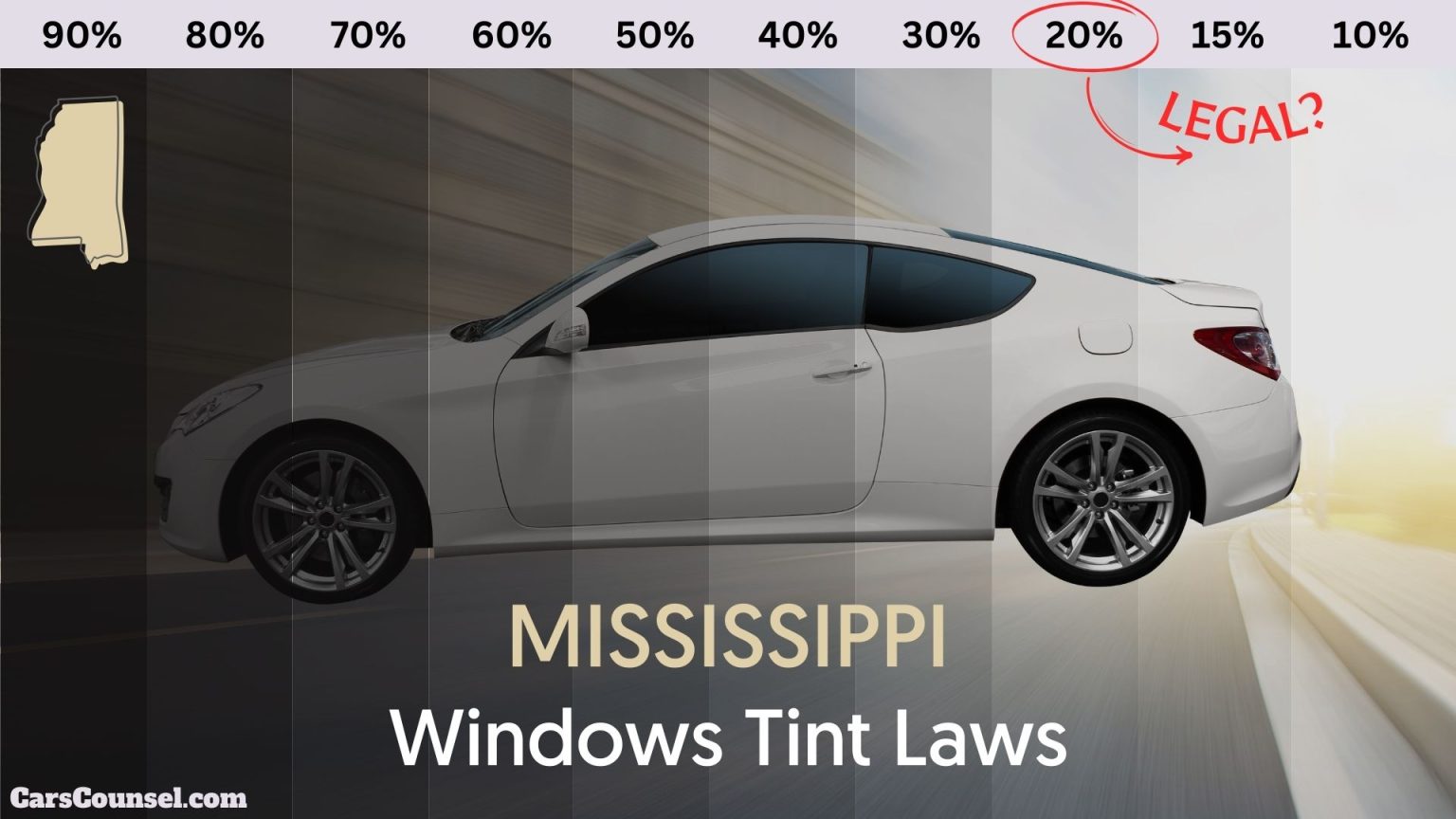 Mississippi Window Tint Laws 2026: Legal Limits & Waivers
Here's a quick tip: if an app promises to give your screen a tint but doesn't have any reviews, or if the reviews are all in a language you don't understand, it might be a good idea to steer clear. It's like ordering food from a restaurant with no menu - you never know what you're going to get.
But What About Those Cool, Illegal Tints?
Alright, let's talk about the elephant in the room. You've probably seen those apps that promise to give your screen a crazy, colorful tint. You know, the ones that make your phone look like it's been dipped in a bag of Skittles. They're fun, they're flashy, and they're... illegal.
Using these apps can damage your phone's display, and they can also make it harder for other people to see your screen. Imagine trying to read a text message on a screen that's been turned into a rainbow - it's not exactly practical. Plus, using them can void your phone's warranty, which is like throwing away a perfectly good safety net.
So, while it might be tempting to give your phone a crazy, colorful makeover, it's usually best to stick with the legal tints. They might not be as flashy, but they're safe, they're practical, and they won't get you into trouble with the phone police.
How to Use Your Phone's Legal MS
Using your phone's legal MS is easy. If it's built into your phone's settings, you can usually find it in the 'Display' or 'Accessibility' menu. If it's an app, it should be pretty self-explanatory. Just download it, open it, and follow the instructions.
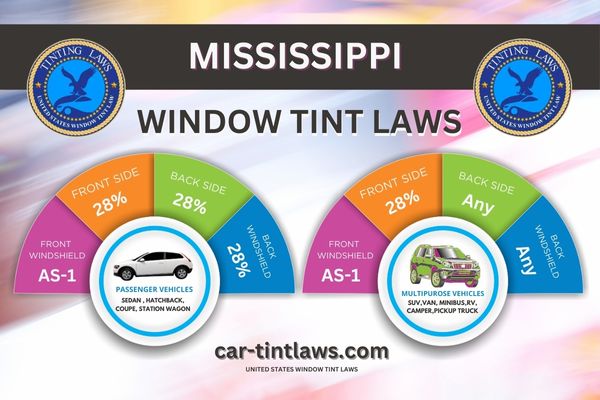 Mississippi Window Tinting Laws (2026 Updated)
Some MS apps might ask for permission to adjust your screen's color temperature. Don't be alarmed - this is normal. It's just the app asking for permission to give your screen its virtual makeover.
Pro Tip: Adjust Your MS Throughout the Day
Just like how you might wear sunglasses in the morning and then switch to regular glasses in the afternoon, it's a good idea to adjust your MS throughout the day. If you're using your phone a lot in the daytime, you might want to give it a warmer tint to make it easier on the eyes. But if you're using it at night, you might want to switch to a cooler tint to help you fall asleep.
Some MS apps even let you set your tint to automatically adjust based on the time of day. It's like having a personal assistant for your phone's screen - pretty neat, huh?
So, Are You Ready to Give Your Phone a Tint?
Hopefully, by now, you've got a good understanding of what MS is, why it's useful, and how to use it safely. So, what are you waiting for? Give your phone a tint and enjoy the difference it makes. Your eyes will thank you - and who knows, you might even start getting compliments on your phone's 'cool' new look.
Just remember: when it comes to MS, legal is always best. It's like the difference between a home-cooked meal and takeout - sure, takeout might be convenient, but it's never as good as the real thing. So, stick with the legal tints, and you'll be enjoying your phone's virtual shades for years to come.
