How Can I Check My Ram Memory

Hey there, tech explorer! Ever wondered if your computer's memory is as sharp as your own? Well, buckle up, 'cause we're about to dive into the fun world of checking your RAM...
Hey there, tech explorer! Ever wondered if your computer's memory is as sharp as your own? Well, buckle up, 'cause we're about to dive into the fun world of checking your RAM memory. It's like checking your brain's short-term memory, but with less existential crisis and more beeps!
Why Check Your RAM, You Ask?
Alright, let's get real for a sec. Your computer's RAM (Random Access Memory) is like its short-term memory. It temporarily stores data that your computer is actively using. The more RAM you have, the more tasks your computer can handle at once without slowing down. So, checking your RAM is like making sure your computer's multitasking skills are up to par. Now, who doesn't love a good multitasker?
Let's Get Started!
First things first, we need to figure out if you're working with a PC or a Mac. Don't worry, we won't judge. We're all about inclusivity here.
Must Read
You're a PC Person, huh?
Alrighty then! Here's how you can check your RAM on a PC:
- Press Windows + Pause/Break keys on your keyboard. This will open the System window. If your keyboard doesn't have a Pause/Break key, you can enable it in your BIOS settings. But that's a story for another day.
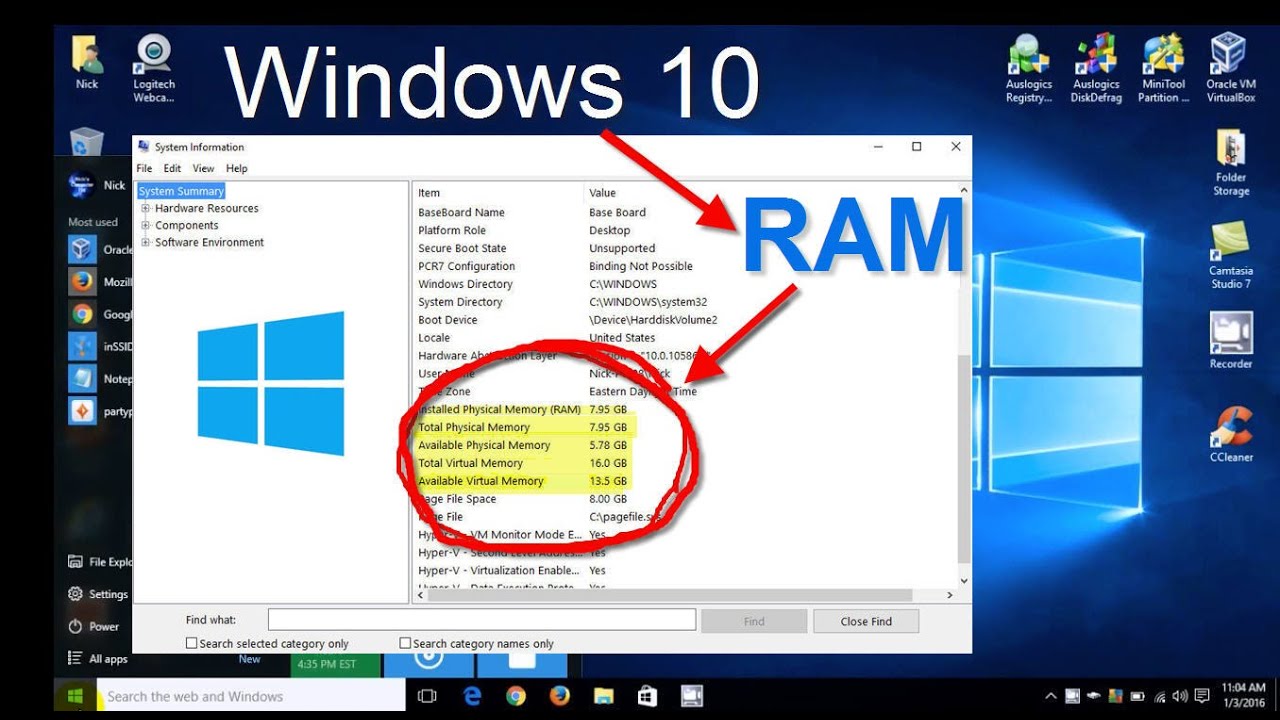
- Scroll down to the System section. Here, you'll find the Installed Memory (RAM) value. This is the total amount of RAM your computer has.
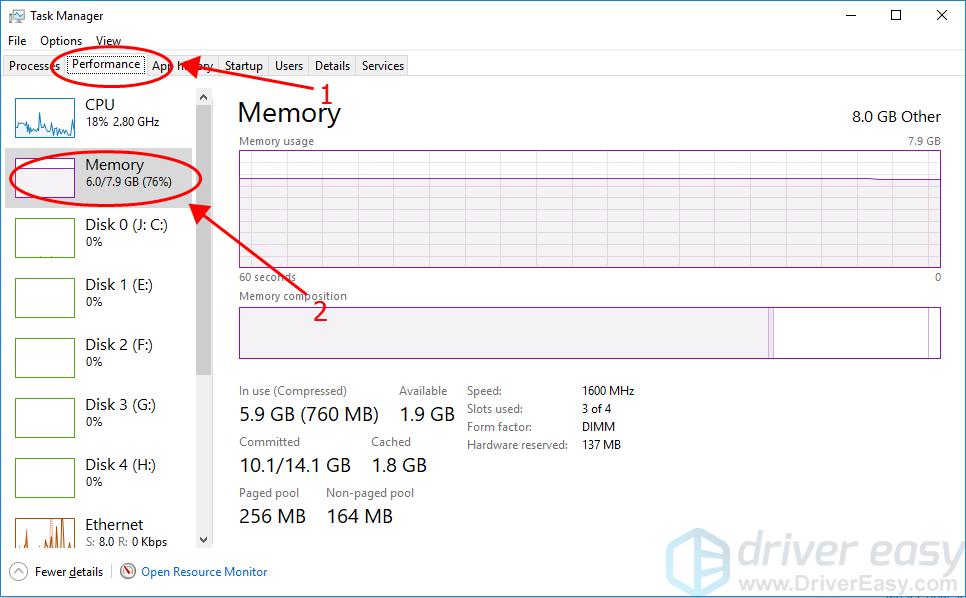
- If you want to know how much RAM you're currently using, right-click on your taskbar and select Task Manager. Go to the Performance tab, then click on Memory. Here, you'll see the amount of RAM being used and the amount that's available.
Easy peasy, right? Now you can brag to your friends about your computer's impressive RAM stats. Just remember, size isn't everything. It's how you use it that counts. wink
You're a Mac Person, huh?
Well, isn't that fancy? Here's how you can check your RAM on a Mac:
 How to Check How Much RAM I Have | Windows & Mac
- Click on the Apple menu in the top-left corner of your screen.
- Select About This Mac. A pop-up window will appear.
- Click on More Info... to open the System Information window. Here, you'll find the Memory value, which is the total amount of RAM your Mac has.
- If you want to know how much RAM you're currently using, click on the Activity Monitor app in your Applications folder. Here, you'll see the amount of RAM being used and the amount that's available.
See, checking your RAM can be fun! It's like playing detective, but with less danger and more tech jargon.
But Wait, What If I Want More RAM?
Well, my friend, that's a whole other ball game. Upgrading your RAM involves opening up your computer and fiddling with tiny components. It's like performing open-heart surgery, but on your computer. If you're feeling brave and have a steady hand, there are plenty of tutorials out there to guide you. But if you're not the DIY type, it might be best to leave it to the professionals.
Remember, more RAM doesn't always mean better performance. It's all about finding the right balance for your needs. And hey, if all else fails, you can always blame your computer for not remembering things. It's not like it can argue back, right?
 How To Check Your Memory On Computer - Autumnbenefit16
So, Why Should You Care?
Checking your RAM is more than just a fun party trick. It's about understanding your computer's capabilities and limitations. It's about making sure your computer is working as hard as you are. And who knows, you might even learn a thing or two about how computers work. After all, knowledge is power, and power is... well, you know the rest.
So, go on, give it a try. Check your RAM. You might just find that your computer is a multitasking marvel, or you might find that it needs a little boost. Either way, you'll be one step closer to understanding the magical world of computers. And who knows, you might even have some fun along the way.
Stay curious, stay tech-savvy, and remember, your computer's RAM might not be as good as your memory, but at least it doesn't forget your birthday. wink
