How To Reset Keypad Garage Door Opener

Ever found yourself in a pickle, standing outside your garage, remote in hand, clicking away like a mad pianist, but your garage door just won't budge? It's like trying to hai...

Ever found yourself in a pickle, standing outside your garage, remote in hand, clicking away like a mad pianist, but your garage door just won't budge? It's like trying to hail a cab in the rain - frustrating, right? Well, don't you worry, we're about to turn you into a garage door whisperer. Today, we're talking about resetting your keypad garage door opener, and it's easier than you think. So, grab a snack, get comfy, and let's dive in.
Why Reset, You Ask?
Resetting your garage door opener keypad is like giving your brain a little reboot after a long day. It can help fix issues like lost programming, multiple remotes opening the same door, or just plain old glitches. Think of it as a spring clean for your garage door's brain.
Before We Begin
First things first, safety first, folks. Make sure your garage door is closed before you start. We don't want any unexpected surprise exits while we're tinkering. Also, have your owner's manual handy. It's like your garage door's user guide - it might not be the most exciting read, but it's got the deets you need.
Meet Your Keypad
Your garage door keypad is like the bouncer of your garage - it lets the right people in. But sometimes, it can get a bit forgetful. So, let's give it a gentle reminder of who's on the guest list.
Step 1: The Learning Mode
To put your keypad into learning mode, you'll need to hold down the 'learn' or 'smart' button on the motor unit. This is usually located on the back of the motor, near the garage ceiling. It's like teaching a toddler their ABCs - you've got to hold their attention, and in this case, that's the 'learn' button.
While you're holding this button down, you'll have about 30 seconds to enter your new code on the keypad. It's like a quick-fire quiz - you've got to be fast, but don't worry, we'll take it slow.
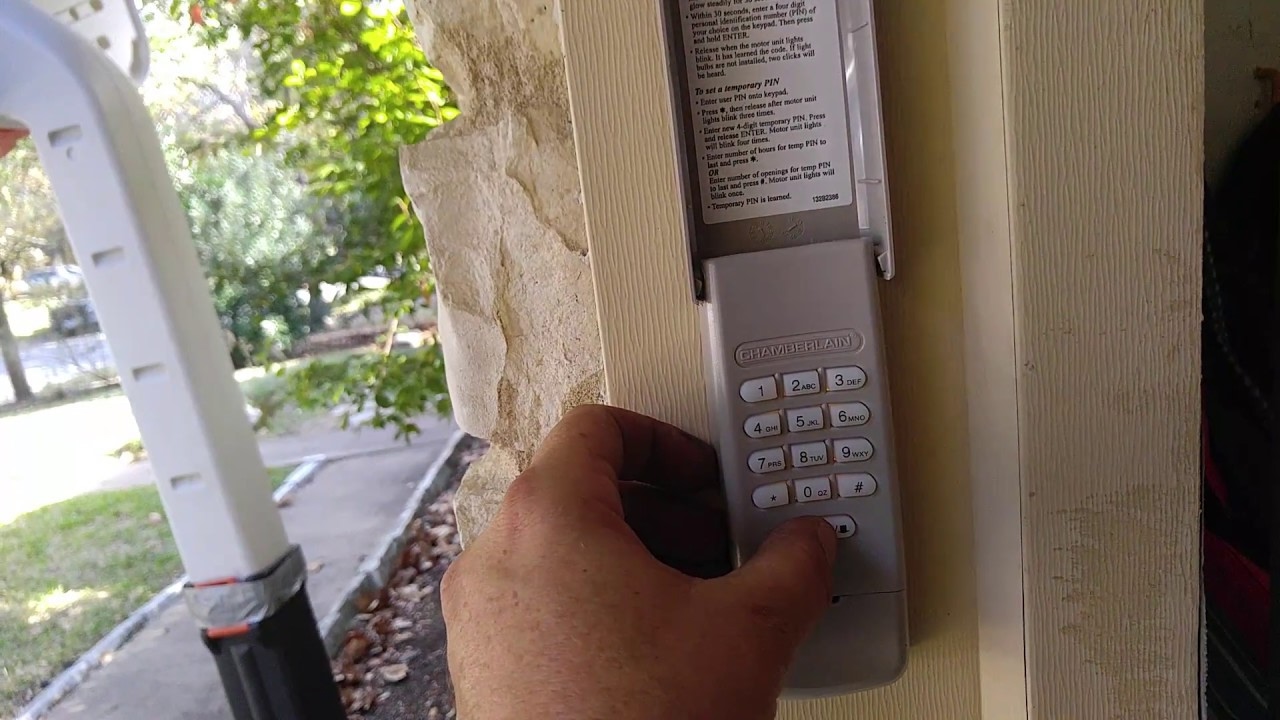 How To Reset Chamberlain Garage Door Opener Keypad Without Code | Storables
Step 2: Enter Your Code
Now, here's where you get to be the boss. You can choose any four-digit code you like, as long as it's not '1234' - we don't want to make it too easy for the neighborhood kids, do we?
Once you've entered your code, release the 'learn' button. If everything's gone according to plan, your garage door should give a little chirp or flash its lights to let you know it's learned your new code. It's like training a puppy - you've got to praise them when they get it right.
Step 3: Test It Out
Now comes the fun part - the test. Enter your new code on the keypad and give it a whirl. If your garage door opens up like a well-oiled machine, then congratulations, you're a garage door reset pro!
But what if it doesn't work? Don't worry, we've all been there. Sometimes, you might need to repeat the process a few times. It's like teaching a new dance move - it might take a few tries before you get it right.
 How To Reset Keypad For Garage Door Opener | Detroit Chinatown
What If It Still Won't Budge?
If your garage door is still playing hard to get, it might be time to call in the big guns - or, you know, the garage door repair guy. But before you do, double-check that your garage door is properly connected to its power source. It's like a plant - if it's not getting the right nutrients, it's not going to grow (or in this case, open).
Also, make sure your garage door isn't stuck on the safety sensors. These are the little eyes at the bottom of your garage door that stop it from closing if something's in the way. If they're misaligned, your garage door might not be playing ball.
And That's a Wrap!
And there you have it, folks! Resetting your garage door opener keypad is like learning a new recipe - it might take a few tries, but once you've got it down, you'll be whipping up garage door magic in no time. So, the next time you find yourself in a garage door pickle, don't panic. Just grab a snack, put on some tunes, and let's get that door open.
Happy resetting, and remember, if all else fails, there's always the good old 'jump out of the car and open the door manually' trick. But let's be honest, that gets old pretty quick. So, let's master the reset, shall we?
