Why Is My Phone Alarm So Quiet

Ever found yourself in a deep sleep, only to be jolted awake by the realization that your phone alarm didn't go off? You're not alone. It's a common conundrum in our always-co...
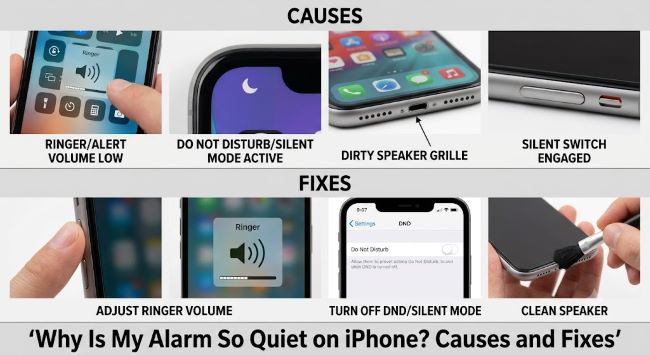
Ever found yourself in a deep sleep, only to be jolted awake by the realization that your phone alarm didn't go off? You're not alone. It's a common conundrum in our always-connected world. But why is your phone alarm so quiet, and more importantly, how can you fix it?
Why Your Alarm Might Be MIA
There are a few reasons why your alarm might not be blasting like it used to. First off, it could be a software glitch. Sometimes, updates can mess with your alarm settings, making it quieter than a library mouse.
Another culprit? Do Not Disturb mode. It's a handy feature that silences calls, alerts, and media, but it can also silence your alarm if you're not careful. And let's not forget the dreaded 'Airplane Mode'. If you accidentally left it on, your alarm's not going anywhere.
Then there's the physical aspect. If your phone's volume is set to low, or the speaker's blocked by your case, your alarm might be trying to wake you up, but it's like a whisper in a hurricane.
When Silence Isn't Golden
Remember the scene in The Big Bang Theory where Sheldon's alarm goes off, and no one can wake him up? That's what we're trying to avoid here. A quiet alarm can lead to oversleeping, missed appointments, and even a late-night panic when you realize you've slept through your alarm.
So, let's fix this. Here are some tips to ensure your alarm is loud and clear.
Check Your Settings
First things first, make sure your alarm is set correctly. Use the loudest tone available, and set the volume to the highest level. Some phones also have a 'Vibrate + Sound' option. Use it.
 Why Is My IPhone Alarm So Quiet? 6 Powerful Solutions To Try
Next, double-check your phone's general volume settings. If your phone's volume is low, your alarm will be too. And while you're at it, make sure Do Not Disturb and Airplane Mode are turned off.
Phone Case SOS
Phone cases can muffle sound, so if you're a heavy sleeper, consider getting a case with a built-in kickstand. This can help amplify the sound and ensure it reaches your ears.
Alternatively, you could try placing your phone face up on a hard surface, like a wooden table or a book. The vibrations can help amplify the sound, making your alarm louder.
Alarm Apps to the Rescue
If your phone's built-in alarm isn't cutting it, consider using a third-party alarm app. Apps like 'AlarmMon' or 'I Can't Wake Up!' offer features like gradual volume increase, backup alarms, and even shake-to-snooze options.
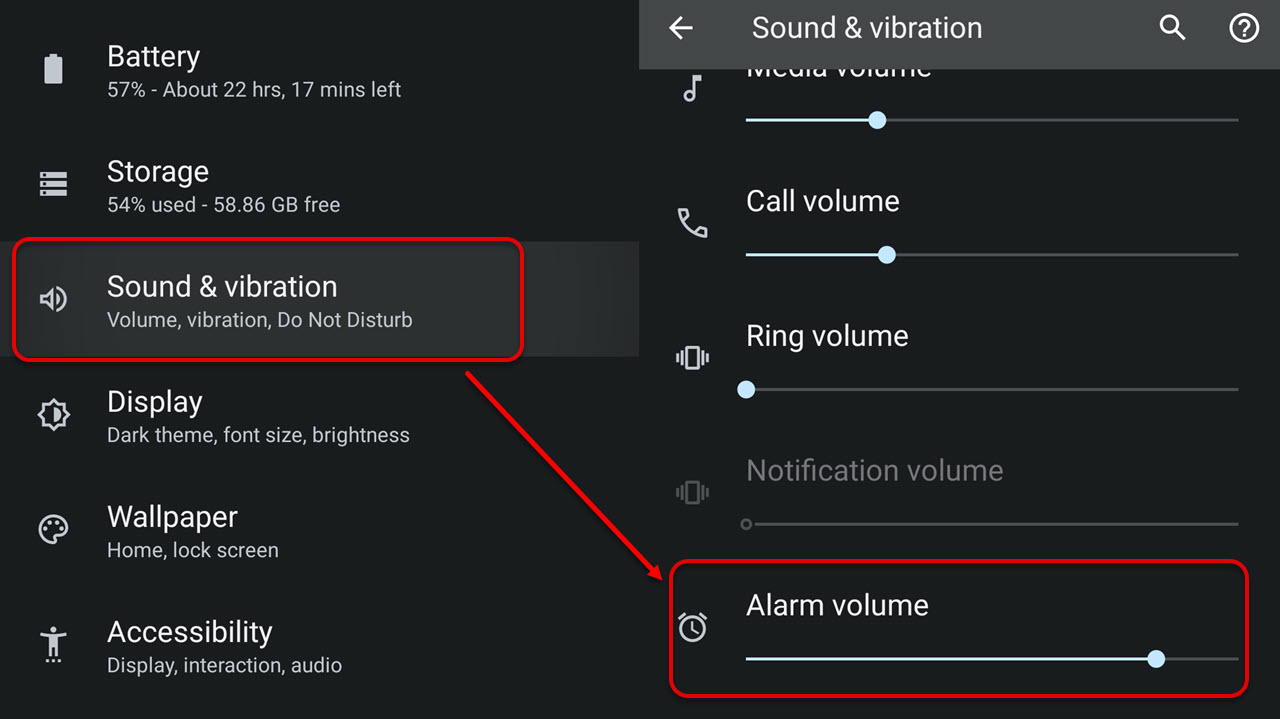 Why is my alarm so quiet?
Some apps even offer 'smart' alarms that use your phone's sensors to determine when you're in a deep sleep phase and wake you up at the optimal time.
Reflecting on the Art of Waking Up
In a world where we rely on technology to wake us up, it's easy to forget the old-fashioned ways. Remember the days of wind-up alarms and analog clocks? There was something comforting about the steady ticking, the physical act of winding it up, and the inevitable jolt when it went off.
Our phones have made our lives easier in countless ways, but sometimes, I wonder if we've lost something in the process. The art of waking up, perhaps. It's not just about the alarm anymore, it's about the ritual, the routine, the transition from sleep to wakefulness.
So, the next time you're setting your alarm, take a moment to appreciate the technology that's become a part of our daily lives. But also, consider the old ways. Maybe there's a middle ground, a way to blend the comfort of the past with the convenience of the present.
After all, waking up should be a joy, not a jolt. And with the right alarm, it can be.
