My Pc Keep Turning On And Off

So, your PC's been playing the world's most annoying game of Simon Says, huh? On, off, on, off. It's like trying to reason with a toddler who's decided that 'no' is their favo...
So, your PC's been playing the world's most annoying game of Simon Says, huh? On, off, on, off. It's like trying to reason with a toddler who's decided that 'no' is their favorite word. But don't worry, we're not going to bore you with tech jargon or make you feel like you need a degree in computer science to fix this. Let's dive in, shall we?
Why the Flashing Light Show?
First things first, let's talk about why your PC is putting on this little light show. It could be a few things, but the most common culprits are power supply issues, overheating, or software glitches. It's like your PC is trying to tell you something, but it's speaking in binary and you're stuck with English. Weird, right?
Power Play
Your PC's power supply unit (PSU) is like the ring leader of this circus. If it's on the fritz, it can cause your PC to turn on and off like a strobe light at a rave. But don't go blaming everything on the PSU just yet. Let's explore some other possibilities.
Must Read
Hot Stuff
Overheating can make your PC act like a drama queen. It's like when you're trying to have a serious conversation with someone, but they keep fanning themselves and saying they're 'too hot' to focus. In this case, your PC is 'too hot' to boot up properly. Gross, right?
Software Shenanigans
Sometimes, it's not a hardware issue at all. It could be a software glitch causing your PC to turn on and off. It's like when you're trying to watch a movie, but the streaming service keeps buffering. Annoying, but not the end of the world.
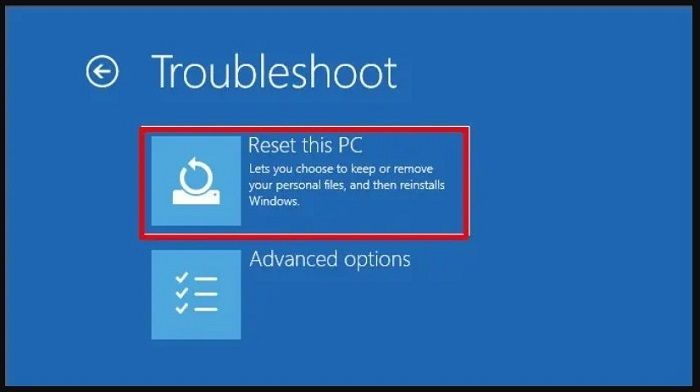 (Don't Worry!) Computer Turns Off and On Repeatedly - EaseUS
Let's Play Detective
Alright, now that we've got our suspects, let's start investigating. Grab a notepad and let's get started.
Power Supply: The Ring Leader
First, let's check if your PSU is the culprit. Try connecting another device to the same power source. If that device works fine, then it's probably not the PSU. But if it's also acting up, it might be time to invest in a new power strip or even a new PSU.
Overheating: The Drama Queen
Next, let's check if your PC is running hot. Feel the back of your PC. If it's hot enough to fry an egg, you've got a problem. Make sure your PC has good ventilation and consider getting some cooling fans. And no, we don't mean those desk fans that look like they're from the 80s. There are some pretty sleek ones out there!
 Why does my PC keep turning off Causes fixes and solutions
Software Shenanigans: The Buffering Bestie
If your PC is cool as a cucumber and your power supply is working fine, it's time to look at software. Try booting into safe mode and see if the problem persists. If it doesn't, you know it's a software issue. From there, you can start troubleshooting specific programs or try a system restore.
When in Doubt, Ask for Backup
If you've tried everything and you're still pulling your hair out, it might be time to call in the big guns. That's right, we're talking about your friendly neighborhood tech support. They've seen it all, so don't be embarrassed. Just remember, they're there to help, not judge.
So, there you have it. Your PC's not playing hard to get, it's just having a bit of a tantrum. With a little detective work and some patience, you'll have it back up and running in no time. And who knows, maybe next time it'll think twice before pulling a stunt like this.
