What Is A Cache On A Computer

So, there I was, sitting in my favorite coffee shop, laptop open, trying to stream the latest episode of my favorite show. You know the drill, right? Coffee in one hand, mouse...
So, there I was, sitting in my favorite coffee shop, laptop open, trying to stream the latest episode of my favorite show. You know the drill, right? Coffee in one hand, mouse in the other, eyes glued to the screen. But suddenly, it happened. That dreaded buffering wheel appeared, spinning like a tiny, mocking top. I swear, it was like watching a real-life hourglass, each grain of sand a second of my life ticking away. I mean, come on, it's the 21st century, not the dial-up era!
Now, I'm no tech expert, but I've been around the block a few times. I knew this wasn't a Wi-Fi issue. No, this was something else. Something my computer was doing to me. And that's when it hit me. Cache. That sneaky little culprit that's always there, lurking in the shadows of our computers, causing more buffering woes than a global internet outage.
So, What's a Cache, Anyway?
Alright, let's rewind a bit. You're here because you want to know what a cache is, right? Well, grab a coffee, get comfy, and let's dive in. Don't worry, I'll keep the tech jargon to a minimum. Pinky promise.
Must Read
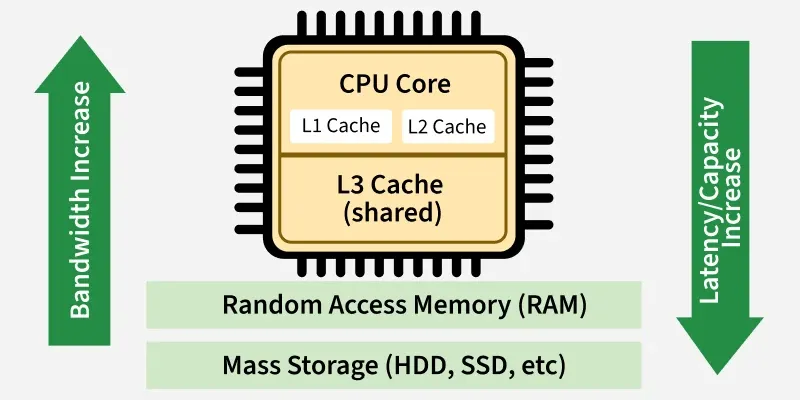
A cache, my friend, is like your computer's personal assistant. It's a small, high-speed memory that stores frequently accessed data. Think of it as a quick-access library for your computer. Whenever you open a file, visit a website, or play a game, your computer checks the cache first. If it's there, boom! Instant access. If not, it has to go digging in the main memory (RAM) or the hard drive, which can take a while.
Why Does My Computer Need a Cache?
You might be thinking, "Why do I need this cache thingy? Can't my computer just do its job without it?" Well, sure, it can. But it wouldn't be very efficient, would it? Imagine if every time you wanted to read a book, you had to go to the library, find the book, check it out, and then read it. That's a lot of work, right? Now, imagine if you had a small, personal library at home, with all your favorite books. You could just grab one and start reading. That's what a cache does for your computer.
It speeds things up. It makes your computer more efficient. It helps reduce the strain on your hardware. And, most importantly, it helps prevent those dreaded buffering wheels from appearing (well, most of the time, at least).
Types of Cache: Because One Just Isn't Enough
Now, you might think that one cache is enough. But no, my friend, that would be too easy. Computers are complex beasts, and they need more than one cache to keep things running smoothly. So, let's meet the gang:
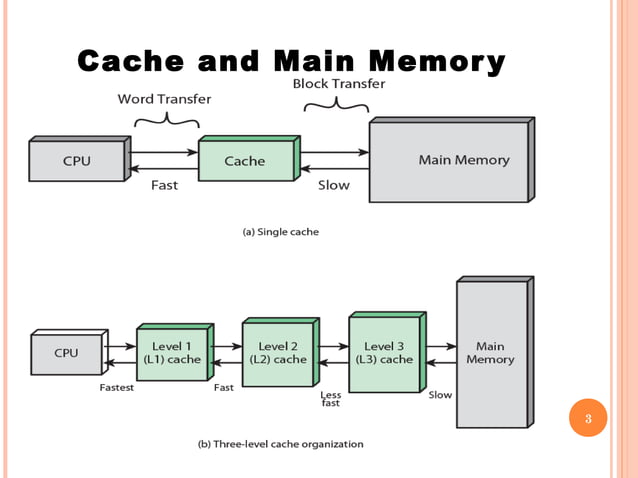 Computer architecture cache memory | PPT
- CPU Cache: This is the brain of the operation. It stores data that the CPU (the brain of your computer) might need in the near future. It's super fast and sits right next to the CPU.
- RAM Cache: Also known as virtual memory, this is where your computer stores data that doesn't fit into the RAM. It's like the overflow parking lot for your computer's data.
- Disk Cache: This guy sits between your hard drive and your computer. It stores frequently accessed data from your hard drive, so your computer doesn't have to keep going back to the source.
Each of these caches has its own job, and together, they help your computer run like a well-oiled machine. Or, at least, that's the idea.
When Caches Go Bad
Now, you might be thinking, "This cache thing sounds great! Why isn't my computer running like a dream all the time?" Well, my friend, it's not always sunshine and roses in the world of caches. Sometimes, they can cause more trouble than they're worth.
You see, caches are like any other part of your computer. They can get corrupted, they can fill up, and they can cause all sorts of issues. Sometimes, they can even cause that dreaded buffering wheel to appear, even when your internet is running smoothly. It's like having a personal assistant who's great at their job, but sometimes, they just mess things up.
But don't worry, there are ways to fix these issues. Clearing your cache, for instance, can often solve a lot of problems. It's like giving your personal assistant a fresh start. They might make a few mistakes at first, but eventually, they'll get back into the swing of things.
So, Should You Clear Your Cache?
Now, you might be wondering, "Should I clear my cache? Is it safe? Will it make my computer run faster?" The answer, my friend, is a resounding maybe. It depends on what you're trying to achieve.
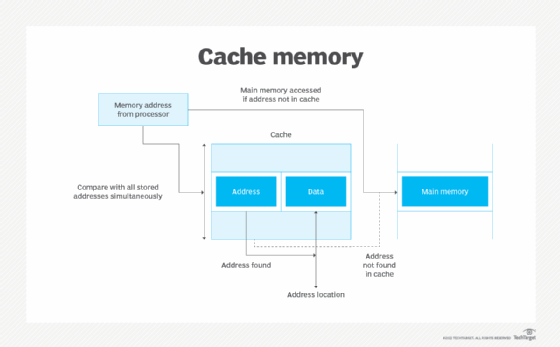 What is Cache Memory? Cache Memory in Computers, Explained
If you're having issues with your computer running slowly, or if you're seeing error messages, then yes, clearing your cache could help. It can free up space, remove corrupted files, and give your computer a fresh start. But be warned, clearing your cache can also delete important data, like saved passwords and website preferences. So, it's a bit of a double-edged sword.
My advice? Be careful. Only clear your cache when you need to. And if you're not sure what you're doing, ask for help. There are plenty of resources out there, and there's no shame in asking for a little guidance.
Final Thoughts
So, there you have it. The lowdown on caches. They're not as scary as they sound, and they're definitely not something you should ignore. They're an essential part of your computer's operation, and understanding how they work can help you keep your computer running smoothly.
And who knows? Next time you're sitting in a coffee shop, laptop open, waiting for that buffering wheel to disappear, you might just find yourself smiling, knowing that your cache is doing its job, making your computer run just a little bit faster.
Until next time, happy computing!
