How Do I Disable My Ig Account

Hey there, tech-savvy friend! Ever felt like your Insta life's been a bit too... well, insta? Like you're constantly scrolling, comparing, and wondering where all your 'me tim...
Hey there, tech-savvy friend! Ever felt like your Insta life's been a bit too... well, insta? Like you're constantly scrolling, comparing, and wondering where all your 'me time' went? It's time to hit the pause button, my friend, and today, we're going to chat about how to disable your Instagram account. Don't worry, it's not as scary as it sounds!
Why Take a Break?
First things first, let's talk about why you might want to take a break from the 'Gram. Maybe you're feeling a bit overwhelmed, or perhaps you just want to focus on the people and things right in front of you. Whatever your reason, know that it's okay to step back and prioritize your well-being.
Think of it like a social media detox - a chance to recharge, reflect, and come back with a fresh perspective. And the best part? You can always come back when you're ready. Instagram's not going anywhere, promise!
Must Read
Disabling vs. Deleting: What's the Difference?
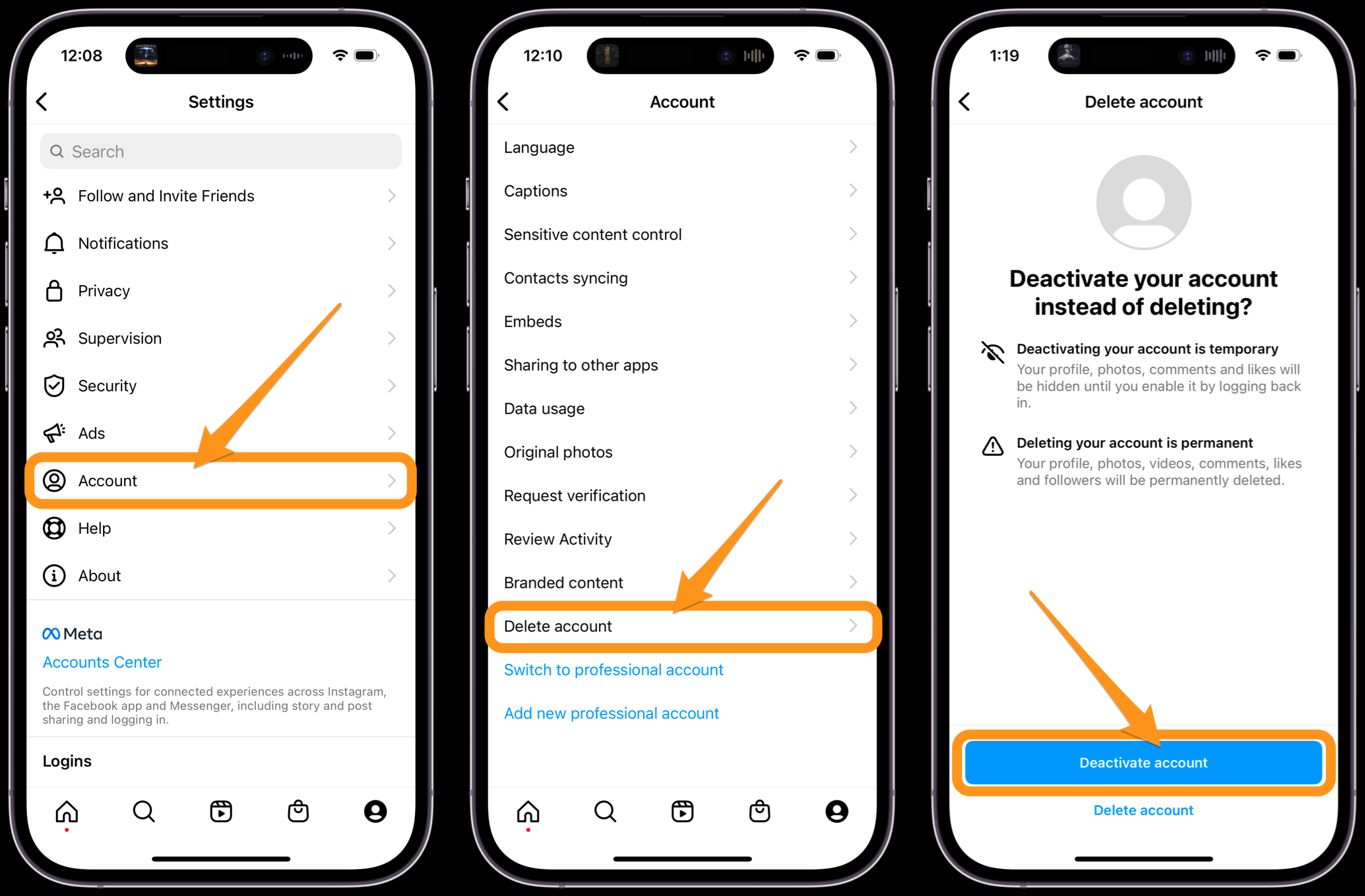
Before we dive into the how-to, let's clear up a common confusion: disabling your account is not the same as deleting it. When you disable your account, your profile, photos, comments, and likes will all be hidden until you decide to reactivate it. It's like hitting the 'mute' button on your Instagram life.
Deleting, on the other hand, is a permanent move. All your data will be wiped out, and you'll have to start from scratch if you ever decide to return. So, if you're just looking for a break, disabling is the way to go!
How to Disable Your Account
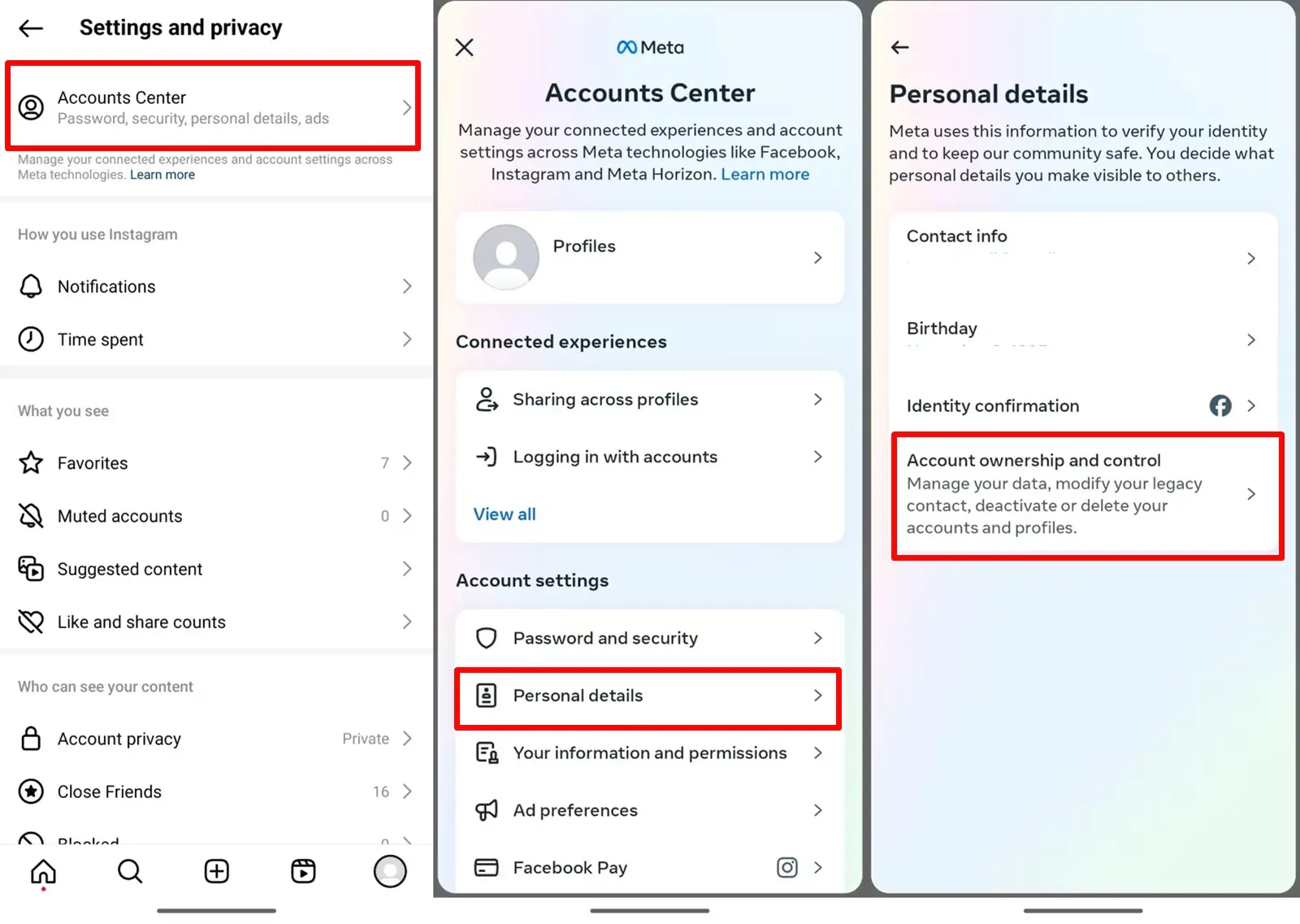
Alright, let's get down to business. Here's how to disable your account in just a few simple steps:
Log in to your Instagram account on a web browser (you can't do this through the app).
 دیلیت اکانت اینستاگرام موقت؛ دی اکتیو کردن ایفون و اندروید
Click on your profile picture in the top right, then select 'Settings'.
Click on 'Privacy and Security' in the menu, then select 'View Account Privacy'.
Scroll down and click on 'Temporarily disable my account' in the bottom right.
Select a reason why you're disabling your account, then re-enter your password.
Click 'Temporarily Disable Account'.
 How to Deactivate Your Instagram Account | Beebom
And just like that, you've hit the pause button on your Instagram life. Easy peasy, right?
What Happens Next?
Once you've disabled your account, your profile will be hidden for 24 hours. After that, it'll stay hidden until you decide to reactivate it. Here's a little secret: you can reactivate your account at any time, and all your photos, comments, and likes will be right there waiting for you. Isn't that a relief?
So, go on, give yourself permission to take a break. You deserve it! And who knows, you might just find that the world outside your phone is even more amazing than the one inside it.
Ready to Recharge?
Remember, taking a break from social media doesn't mean you have to go off the grid completely. You can still stay connected with friends and family through other means, like good old-fashioned text messages or even (gasp!) phone calls. Who knows, you might even pick up a new hobby or rediscover an old one!
So, what are you waiting for? The world's waiting, and you're ready to recharge. Go on, hit that 'disable' button and embrace the break you deserve. And when you're ready to dive back in, Instagram will be right here waiting for you. Happy detoxing, friend!
