How Do You Mod The Sims 4

Alright, gather 'round, my digital divas and tech-savvy studs. We're about to embark on a wild ride into the heart of Sims 4 modding. Now, I know what you're thinking, "Moddin...
Alright, gather 'round, my digital divas and tech-savvy studs. We're about to embark on a wild ride into the heart of Sims 4 modding. Now, I know what you're thinking, "Modding? Isn't that just for those crazy, basement-dwelling, Cheeto-fingered gamers?" Well, let me stop you right there. Modding is like the secret spice rack of Sims 4, and you, my friend, are about to become the ultimate chef.
First Things First: What's a Mod?
In simple terms, a mod is like a little helper that sneaks into your game and gives it a makeover. It can add new stuff, change old stuff, or even make stuff disappear. Think of it as giving your Sims a magical facelift, or turning their humble abode into a palace. But remember, not all mods are created equal. Some are like Michelangelo, painting masterpieces, while others are like that one friend who thinks a traffic cone on your head is a fashion statement.
Let's Get Started: The Modding Basics
First things first, you're gonna need a mod manager. This is like your personal assistant, keeping all your mods organized and making sure they play nice together. There are a few out there, but Mod The Sims is like the Beyoncé of mod managers - it just works.
Must Read
Now, before you start downloading mods like they're going out of style, you need to know that Sims 4 is a bit of a diva. It doesn't like to share its toys, so you'll need to tell it to play nice. This is called enabling 'Script Mods' in your game options. Don't worry, it's not as scary as it sounds. Just click on 'Game Options' in the main menu, then 'Other', and tick that little box that says 'Enable Script Mods'. Easy peasy.
Mods, Mods, Mods: Where to Find Them
Alright, now that you've got your mod manager and your game is ready to party, it's time to find some mods. The biggest and best mod site out there is The Sims Resource. It's like the Amazon of Sims 4 mods, with more options than you can shake a stick at. But remember, not all mods are created equal. Always check the reviews and make sure you're downloading from a reputable creator.
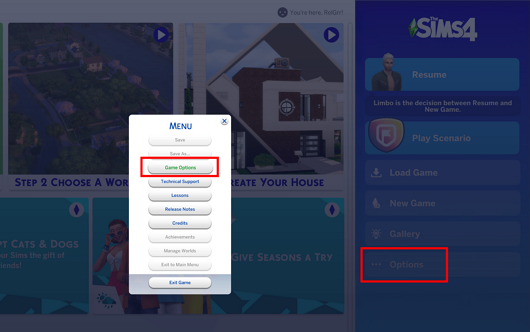 Guides détaillés : Comment installer des mods dans les Sims 4 - EaseUS
And hey, if you're feeling like a bit of a digital daredevil, you can even try your hand at creating your own mods. There are tools out there like Sims 4 Studio that make it as easy as painting a picture. Well, maybe not that easy, but you get the idea.
Now, Let's Talk Safety
Modding can be a bit like playing with fire. Do it right, and you'll have a cozy campfire. Do it wrong, and you'll burn down the forest. So, here are a few safety tips:
 How to Download/Install Mods & Custom Content in The Sims 4 | itsmeTroi
- Always back up your game before you start modding. You can never have too many safety nets.
- Read the mod instructions. Yes, I know, it's like reading the instruction manual for your toaster, but trust me, it's worth it.
- Don't go mod-crazy. Too many mods can make your game cranky. It's like trying to fit too many people into a tiny apartment - someone's gonna end up sleeping on the floor.
- If a mod makes your game act funny, delete it. It's not worth risking your game's health.
And Finally, the Million Dollar Question: Can Modding Get Me Banned?
Alright, let's address the elephant in the room. EA, the bigwigs behind Sims 4, aren't huge fans of modding. They see it as tampering with their precious game, and they don't like it one bit. But here's the thing - they're not actively hunting down modders. It's like having a strict parent who knows you're sneaking out, but as long as you're quiet and don't leave any evidence, they'll turn a blind eye.
Just remember, if you're using mods that give you an unfair advantage in online play, you're playing with fire. EA can and will ban you if they catch you. So, keep it fair, keep it fun, and you'll be just fine.
So, Are You Ready to Dive In?
Modding Sims 4 can be a wild ride, but it's one hell of a fun one. It's like giving your Sims a whole new world to play in, and who knows, you might even become the next big thing in the modding community. So, grab your virtual toolbox, and let's get modding!
